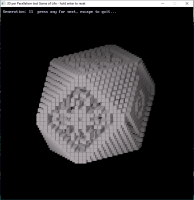
This time we start out with simple "Blinker" in the 2D version and see what becomes of it in 3D version per parallelism:
It's Alive! well at least until it blows it's symmetry
Code: (Select All)
_Title "3D per Parallelism test Game of Life - hold enter to reset" ' started Parallelism b+ 2024-02-20

'  "parallelism suggests a connection of meaning through an echo of form"

' 2024-02-21 Pyramid 2 screw around with pyramid numbers fix projection formula

' 2024-02-21 now test cubes with DrawCube sub

' 2024-02-21 return to Pyramid 2 and fix that according to how this Project sub works.

' 2024-02-22 test Game of Life code from thisversion of DrawCube

'            Ah! apply some tips I learned with 3D Rendering of Game of Life


Dim Shared As Long SW, SH: SW = 720: SH = 720

Screen _NewImage(SW, SH, 32)

_ScreenMove 280, 0

Randomize Timer


Type XYZ

    As Single x, y, z

End Type

Type XY

    As Single x, y

End Type

Dim Shared PC: PC = .35 ' or something  PC = Parallel Constant

Window (-15, 35)-(35, -15) ' setup for 3D


' setup for Game of Life

Dim As Integer xmin, xmax, ymin, ymax, zmin, zmax

xmin = 1: xmax = 30: ymin = 1: ymax = 30: zmin = 1: zmax = 30

Dim As Integer x, y, z, r, g, b, mm, xx, yy, zz, rr, gg, bb, gen

Color &HFFDDDDFF, &HFF000000


ResetStart:

gen = 0

ReDim As Integer U(xmin To xmax, ymin To ymax, zmin To zmax), U2(xmin To xmax, ymin To ymax, zmin To zmax)

'For z = zmin + 10 To zmax - 10

'    For x = xmin + 10 To xmax - 10

'        For y = ymin + 10 To ymax - 10

'            If Rnd > .9 Then U(x, y, z) = 1

'Next y, x, z


'try a blinker

U(14, 15, 15) = 1: U(15, 15, 15) = 1: U(16, 15, 15) = 1

rr = Rnd * 50 + 50: gg = Rnd * 50 + 50: bb = Rnd * 50 + 50


Do

    Cls

    _PrintString (10, 10), "Generation:" + Str$(gen) + "  press any for next, escape to quit... "

    r = rr: g = gg: b = bb

    For z = zmin + 1 To zmax - 1

        r = r * 1.04: g = g * 1.04: b = b * 1.04

        For x = xmin + 1 To xmax - 1

            For y = ymin + 1 To ymax - 1

                If U(x, y, z) = 1 Then

                    drawCube x, y, z, .9, _RGB32(r, g, b)

                End If

        Next y, x

        _Display

        _Limit 30

    Next z

    _Display

    Sleep

    If _KeyDown(13) Then Cls: _Delay .5: GoTo ResetStart

    For z = zmin + 1 To zmax - 1

        For x = xmin + 1 To xmax - 1

            For y = ymin + 1 To ymax - 1

                mm = 0

                For xx = x - 1 To x + 1

                    For yy = y - 1 To y + 1

                        For zz = z - 1 To z + 1

                            If x = xx And y = yy And z = zz Then

                            Else

                                If U(xx, yy, zz) = 1 Then mm = mm + 1

                            End If

                Next zz, yy, xx

                If (mm > 1) And (mm < 4) Then ' neighbors for birth

                    U2(x, y, z) = 1

                ElseIf U(x, y, z) = 1 And mm = 3 Then ' neighbors to survive

                    U2(x, y, z) = 1

                Else

                    U2(x, y, z) = 0

                End If

        Next y, x

    Next z


    For z = zmin + 1 To zmax - 1

        For x = xmin + 1 To xmax - 1

            For y = ymin + 1 To ymax - 1

                U(x, y, z) = U2(x, y, z)

    Next y, x, z

    gen = gen + 1

Loop Until _KeyDown(27)


Sub drawCube (cx, cy, cz, side, colr~&) 'draw a cube on screen from an xyz() 3D array

    Dim As Integer i, r, g, b

    Dim sd2, lx, rx, ty, by, fz, bz

    Dim c2 As _Unsigned Long

    r = _Red32(colr~&): g = _Green32(colr~&): b = _Blue32(colr~&)

    ReDim corners(0 To 7) As XYZ

    sd2 = side / 2

    rx = cx + sd2: lx = cx - sd2

    ty = cy + sd2: by = cy - sd2

    fz = cz + sd2: bz = cz - sd2

    'bck face

    corners(0).x = lx: corners(0).y = ty: corners(0).z = bz

    corners(1).x = rx: corners(1).y = ty: corners(1).z = bz

    corners(2).x = rx: corners(2).y = by: corners(2).z = bz

    corners(3).x = lx: corners(3).y = by: corners(3).z = bz

    'frt face

    corners(4).x = lx: corners(4).y = ty: corners(4).z = fz

    corners(5).x = rx: corners(5).y = ty: corners(5).z = fz

    corners(6).x = rx: corners(6).y = by: corners(6).z = fz

    corners(7).x = lx: corners(7).y = by: corners(7).z = fz


    ReDim xy(0 To 7) As XY

    For i = 0 To 7

        Project corners(i), xy(i) ' take a corner x,y,z and convert to screen coordinates x,y

    Next


    'debug

    'back face

    'Line (xy(0).x, xy(0).y)-(xy(1).x, xy(1).y), &HFFFF0000

    'Line (xy(1).x, xy(1).y)-(xy(2).x, xy(2).y), colr~&

    'Line (xy(2).x, xy(2).y)-(xy(3).x, xy(3).y), colr~&

    'Line (xy(3).x, xy(3).y)-(xy(0).x, xy(0).y), colr~&


    'front face

    'Line (xy(4).x, xy(4).y)-(xy(5).x, xy(5).y), colr~&

    'Line (xy(5).x, xy(5).y)-(xy(6).x, xy(6).y), colr~&

    'Line (xy(6).x, xy(6).y)-(xy(7).x, xy(7).y), colr~&

    'Line (xy(7).x, xy(7).y)-(xy(4).x, xy(4).y), colr~&


    ' top face

    c2 = _RGB32(.85 * r, .85 * g, .85 * b)

    FillTriangle PMap(xy(0).x, 0), PMap(xy(0).y, 1), PMap(xy(1).x, 0), PMap(xy(1).y, 1), PMap(xy(4).x, 0), PMap(xy(4).y, 1), c2

    FillTriangle PMap(xy(4).x, 0), PMap(xy(4).y, 1), PMap(xy(5).x, 0), PMap(xy(5).y, 1), PMap(xy(1).x, 0), PMap(xy(1).y, 1), c2


    ' right face

    c2 = _RGB32(.6 * r, .6 * g, .6 * b)

    FillTriangle PMap(xy(1).x, 0), PMap(xy(1).y, 1), PMap(xy(2).x, 0), PMap(xy(2).y, 1), PMap(xy(5).x, 0), PMap(xy(5).y, 1), c2

    FillTriangle PMap(xy(5).x, 0), PMap(xy(5).y, 1), PMap(xy(6).x, 0), PMap(xy(6).y, 1), PMap(xy(2).x, 0), PMap(xy(2).y, 1), c2


    ' front face

    FillTriangle PMap(xy(4).x, 0), PMap(xy(4).y, 1), PMap(xy(5).x, 0), PMap(xy(5).y, 1), PMap(xy(6).x, 0), PMap(xy(6).y, 1), colr~&

    FillTriangle PMap(xy(6).x, 0), PMap(xy(6).y, 1), PMap(xy(7).x, 0), PMap(xy(7).y, 1), PMap(xy(4).x, 0), PMap(xy(4).y, 1), colr~&


End Sub


' steves latest version to check out, seems to be working OK

Sub FillTriangle (x1, y1, x2, y2, x3, y3, K As _Unsigned Long)

    $Checking:Off

    Static a&, m As _MEM

    If a& = 0 Then a& = _NewImage(1, 1, 32): m = _MemImage(a&)

    _MemPut m, m.OFFSET, K

    _MapTriangle _Seamless(0, 0)-(0, 0)-(0, 0), a& To(x1, y1)-(x2, y2)-(x3, y3)

    $Checking:On

End Sub


' here I am working with a Window so Screen obeys right hand rule so as z increases

' the image x, y plane is closer to the eye/camera so is bigger

' but should be distance squared

' thankyou vince '2024-02  the bigger the Z the closer it is to the eye the greater the image

Sub Project (pIN As XYZ, pOut As XY) 'M2SPP = Model (3D) 2 Screen Per Parallelism

    pOut.x = pIN.x - PC * pIN.z

    pOut.y = pIN.y - PC * pIN.z

End Sub
It's Alive!
well at least until it blows it's symmetry
724 855 599 923 575 468 400 206 147 564 878 823 652 556 bxor cross forever