




06-03-2024, 12:04 AM
ClickAwayBalls is another little game that @bplus helped me with at the old forum. Numbered balls bounce around over a moving plasma background. You click them away in order before the timer runs out. Updated it to fit larger desktops and added new font style and win/lose message.
- Dav
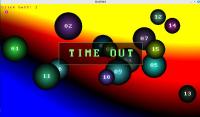
- Dav
Code: (Select All)
'ClickAwayBalls.bas v1.2

'by Dav, JUN/2024


'* NEW: using a new font, larger screen size, fixed gameover flag.


'Some helpful mod & tweaks by bplus.  Thanks bplus!!!


'Click on balls in order, starting at 1 until all gone,

'Do this before the timer runs out.


Randomize Timer

dw = Int(_DesktopWidth * .75) 'set board size based on user desktop size

dh = Int(_DesktopHeight * .75)


Screen _NewImage(dw, dh, 32)


_Delay .25

_ScreenMove _Middle

_PrintMode _KeepBackground


balls = 15: size = 45: speed = 3


ReDim BallX(balls), BallY(balls), BallDx(balls), BallDy(balls), BallSize(balls), BallShow(balls), BallC(balls) As _Unsigned Long


w = _Width: h = _Height: w2 = _Width / 2: h2 = _Height / 2


restart:


'Generate random ball data

For B = 1 To balls

    BallSize(B) = 50 + (Rnd * 50)

    BallX(B) = BallSize(B) + Rnd * (w - 2 * BallSize(B)): BallY(B) = BallSize(B) + Rnd * (h - 2 * BallSize(B))

    a = Rnd * _Pi(2): Ballspeed = 2 + B

    BallDx(B) = Ballspeed * Cos(a): BallDy(B) = Ballspeed * Sin(a)

    BallShow(B) = 1: BallC(B) = _RGB32(Rnd * 255, Rnd * 255, Rnd * 255)

Next


curball = 1

gametime = Timer

gameover = 0


timelimit = 45


Do

    Cls

    'compute ball movement

    For t = 1 To balls

        BallX(t) = BallX(t) + BallDx(t) 'move ball then make sure in bounds

        BallY(t) = BallY(t) + BallDy(t)

        If BallX(t) > w - BallSize(t) Then BallDx(t) = -BallDx(t): BallX(t) = w - BallSize(t)

        If BallX(t) < BallSize(t) Then BallDx(t) = -BallDx(t): BallX(t) = BallSize(t)

        If BallY(t) > h - BallSize(t) Then BallDy(t) = -BallDy(t): BallY(t) = h - BallSize(t)

        If BallY(t) < BallSize(t) Then BallDy(t) = -BallDy(t): BallY(t) = BallSize(t)

    Next

    'draw background

    t = Timer

    For x = 0 To w Step 6

        For y = 0 To h Step 6

            r = Sin(1.1 * t) * h2 - y + h2

            Line (x, y)-Step(5, 5), _RGB(r, r - y, -r), BF

        Next

        t = t + .01

        GoSub GetMouseClick

    Next


    If gameover = 1 Then

        Play "o2l16cegagfefgabgc3l4"

        cx = _Width / 2: cy = _Height / 2

        Line (cx - 300, cy - 130)-(cx + 300, cy + 30), _RGBA(0, 0, 0, 150), BF

        Line (cx - 300, cy - 130)-(cx + 300, cy + 30), _RGB(128, 255, 128), B

        PPRINT cx - 200, cy - 90, 60, _RGB(128, 255, 128), 1, "WINNER!!"

        _Display

        Sleep 4

        GoTo restart

    End If


    'draw balls

    For i = 1 To balls

        If BallShow(i) = 1 Then

            drawBall BallX(i), BallY(i), BallSize(i), BallC(i)

            'PPRINT BallX(i) - 12, BallY(i) - 12, 30, _RGB(1, 1, 1), 1, Right$("0" + _Trim$(Str$(i)), 2)

            PPRINT BallX(i) - 10, BallY(i) - 20, 30, _RGB(255, 255, 255), 1, Right$("0" + _Trim$(Str$(i)), 2)

        End If

    Next


    'Locate 1, 1: Print "Click ball.."; curball;

    PPRINT 20, 10, 20, _RGB(255, 0, Rnd * 255), 1, "Click ball: " + _Trim$(Str$(curball))

    'Locate 2, 1: Print timelimit - Int(Timer - gametime);

    PPRINT 20, 40, 30, _RGB(255, 0, Rnd * 255), 1, Str$(timelimit - Int(Timer - gametime))


    _Display: _Limit 30


    'If click on one ball (no overlayed oned) remove it

    If found = 1 Then

        If firstball = curball Then

            'erase ball

            drawBall BallX(firstball), BallY(firstball), BallSize(firstball), BallC(firstball)

            BallShow(firstball) = 0

            Play "mbl32o2ceg"

            _Display: _Delay .05

            curball = curball + 1

            found = 0

        Else

            found = found + 1

            lastfound = firstball

        End If

    End If


    'check if all clicked

    anyleft = 0

    For c = 1 To balls

        If BallShow(c) = 1 Then anyleft = anyleft + 1

    Next

    If anyleft = 0 Then

        gameover = 1

    End If


    If Timer - gametime > timelimit Then

        Play "mbo1l4dl8ddl4dl8feeddc#l2d"

        cx = _Width / 2: cy = _Height / 2

        Line (cx - 300, cy - 130)-(cx + 300, cy + 30), _RGBA(0, 0, 0, 150), BF

        Line (cx - 300, cy - 130)-(cx + 300, cy + 30), _RGB(128, 255, 128), B

        PPRINT cx - 200, cy - 90, 60, _RGB(128, 255, 128), 1, "TIME OUT"

        _Display

        Sleep 4

        GoTo restart

    End If


Loop


End


'==============

GetMouseClick:

'==============


mi = _MouseInput

If _MouseButton(1) = 0 Then done = 0

If _MouseButton(1) And done = 0 Then

    mx = _MouseX: my = _MouseY

    found = 0

    For m = 1 To balls

        If BallShow(m) = 1 Then

            If Sqr((mx - BallX(m)) ^ 2 + (my - BallY(m)) ^ 2) < BallSize(m) Then

                If found = 0 Then firstball = m

                found = found + 1

                If found > 1 Then

                    lastfound = m

                End If

            End If

        End If

    Next

    done = 1

End If


Return


Sub drawBall (x, y, r, c As _Unsigned Long)

    Dim rred As Long, grn As Long, blu As Long, rr As Long, f

    rred = _Red32(c): grn = _Green32(c): blu = _Blue32(c)

    For rr = r To 0 Step -1

        f = 1 - rr / r

        fcirc x, y, rr, _RGB32(rred * f, grn * f, blu * f)

    Next

End Sub


Sub fcirc (CX As Integer, CY As Integer, R As Integer, C As _Unsigned Long)

    Dim Radius As Integer, RadiusError As Integer

    Dim X As Integer, Y As Integer

    Radius = Abs(R): RadiusError = -Radius: X = Radius: Y = 0

    If Radius = 0 Then PSet (CX, CY), C: Exit Sub

    Line (CX - X, CY)-(CX + X, CY), C, BF

    While X > Y

        RadiusError = RadiusError + Y * 2 + 1

        If RadiusError >= 0 Then

            If X <> Y + 1 Then

                Line (CX - Y, CY - X)-(CX + Y, CY - X), C, BF

                Line (CX - Y, CY + X)-(CX + Y, CY + X), C, BF

            End If

            X = X - 1

            RadiusError = RadiusError - X * 2

        End If

        Y = Y + 1

        Line (CX - X, CY - Y)-(CX + X, CY - Y), C, BF

        Line (CX - X, CY + Y)-(CX + X, CY + Y), C, BF

    Wend

End Sub


Sub PPRINT (x, y, size, clr&, trans&, text$)

    'This sub outputs to the current _DEST set

    'It makes trans& the transparent color


    'x/y is where to print text

    'size is the font size to use

    'clr& is the color of your text

    'trans& is the background transparent color

    'text$ is the string to print


    '=== get users current write screen

    orig& = _Dest


    '=== if you are using an 8 or 32 bit screen

    bit = 32: If _PixelSize(0) = 1 Then bit = 256


    '=== step through your text

    For t = 0 To Len(text$) - 1

        '=== make a temp screen to use

        pprintimg& = _NewImage(16, 16, bit)

        _Dest pprintimg&

        '=== set colors and print text

        Cls , trans&: Color clr&

        Print Mid$(text$, t + 1, 1);

        '== make background color the transprent one

        _ClearColor _RGB(0, 0, 0), pprintimg&

        '=== go back to original screen  to output

        _Dest orig&

        '=== set it and forget it

        x1 = x + (t * size): x2 = x1 + size

        y1 = y: y2 = y + size

        _PutImage (x1 - (size / 2), y1)-(x2, y2 + (size / 3)), pprintimg&

        _FreeImage pprintimg&

    Next


End Sub

 working fine on my end.