Posts: 4,698
Threads: 222
Joined: Apr 2022
Reputation:
322
04-08-2023, 05:05 PM
(This post was last modified: 04-08-2023, 05:07 PM by bplus.)
Code: (Select All) _Title "Centering text inside a box of X's" ' b+ 2023-04-08
Screen _NewImage(800, 600, 32)
f& = _LoadFont("c:\WINDOWS\Fonts\arial.ttf", 24, "bold")
_Font f&
_PrintMode _KeepBackground
MessageBox "Centering text inside a box of X's, ...zzz", "X", &HFF0000FF, &HFFFFFFFF
Sleep
Cls
' OK generalize this for any meessage, character block and font size
f& = _LoadFont("c:\WINDOWS\Fonts\cambriab.ttf", 30, "Monospace")
f& = _LoadFont("c:\WINDOWS\Fonts\cambriab.ttf", 40)
_Font f&
MessageBox "bplus was here, ...zzz", "b", &HFFFF0000, &HFFBBBBFF
Sleep
Cls
f& = _LoadFont("c:\WINDOWS\Fonts\inkfree.ttf", 50)
_Font f&
MessageBox "bplus was here, ...zzz", "+", &HFFFF0000, &HFFBBBBFF
Sleep
' assuming font is loaded and _font handle activated AND _PrintMode _KeepBackground
' assuming message will fit on one line inside screen plus 4 extra Box characters
Sub MessageBox (message$, boxCharacter$, boxColor~&, PrintColor~&)
' note: "X" was the original Box Character used
pwMessage = _PrintWidth(message$) ' print width of message$
pwX = _PrintWidth(boxCharacter$) ' print width of 1 X
addxs = pwMessage + 4 * pwX ' width of X box
' X + space + message + space + X AND spaces same width as X = 4 * pwX
fh = _FontHeight
y = (_Height - 5 * fh) / 2 ' y start x's top corner of box
' how many x's fit in add2x
nx = (addxs + .5 * pwX) \ pwX ' round up to convert message line to a number of X's to print
pwNX = _PrintWidth(String$(nx, boxCharacter$))
x = (_Width - pwNX) / 2 ' x start x's left side of box
diff = pwNX - pwMessage ' what is difference between n printed X's and message line?
Line (x, y)-Step(pwNX, 5 * fh), boxColor~&, BF
Color PrintColor~&
For i = 0 To 4
If i = 0 Or i = 4 Then
_PrintString (x, y + (i * fh)), String$(nx, boxCharacter$)
Else
_PrintString (x, y + (i * fh)), boxCharacter$
_PrintString (x + pwNX - pwX, y + (i * fh)), boxCharacter$
End If
Next
_PrintString (x + .5 * diff, y + 2 * fh), message$ ' for perfect center, add .5*difference
End Sub
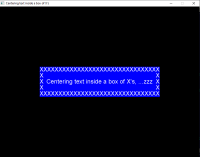
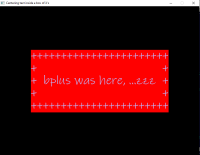
724 855 599 923 575 468 400 206 147 564 878 823 652 556 bxor cross forever
Posts: 1,356
Threads: 58
Joined: Jul 2022
Reputation:
53
Snow White says, well done, sleepy! (evil smile)
Posts: 4,698
Threads: 222
Joined: Apr 2022
Reputation:
322
04-08-2023, 11:44 PM
(This post was last modified: 04-08-2023, 11:45 PM by bplus.)
This looks much sharper!
Code: (Select All) _Title "Centering text inside a box" ' b+ 2023-04-08
Screen _NewImage(800, 600, 32)
f& = _LoadFont("c:\WINDOWS\Fonts\arial.ttf", 24, "bold")
_Font f&
_PrintMode _KeepBackground
MessageBox "Centering text inside a box of X's, ...zzz", &HFF0000FF, &HFFFFFFFF
Sleep
Cls
' OK generalize this for any meessage, character block and font size
f& = _LoadFont("c:\WINDOWS\Fonts\cambriab.ttf", 30, "Monospace")
f& = _LoadFont("c:\WINDOWS\Fonts\cambriab.ttf", 40)
_Font f&
MessageBox "bplus was here, ...zzz", &HFFFF0000, &HFFBBBBFF
Sleep
' assuming font is loaded and _font handle activated AND _PrintMode _KeepBackground
' assuming message will fit on one line inside screen plus 4 extra Box characters
Sub MessageBox (message$, boxColor~&, PrintColor~&)
' note: "X" was the original Box Character used
pwMessage = _PrintWidth(message$) ' print width of message$
pwX = _PrintWidth("X") ' print width of 1 X
addxs = pwMessage + 4 * pwX ' width of X box
fh = _FontHeight
y = (_Height - 5 * fh) / 2 ' y start x's top corner of box
x = (_Width - addxs) / 2 ' x start x's left side of box
Line (x, y)-Step(addxs, 5 * fh), boxColor~&, BF
Color PrintColor~&
Line (x + 2, y + 2)-Step(addxs - 4, 5 * fh - 4), , B
Line (x + 4, y + 4)-Step(addxs - 8, 5 * fh - 8), , B
_PrintString (x + 2 * pwX, y + 2 * fh), message$ ' for perfect center, add .5*difference
End Sub
And less code! 


724 855 599 923 575 468 400 206 147 564 878 823 652 556 bxor cross forever
Posts: 4,698
Threads: 222
Joined: Apr 2022
Reputation:
322
And centering in anywhere, any size boxes:
Code: (Select All) _Title "Centering text inside anywhere box" ' b+ 2023-04-08
Screen _NewImage(800, 600, 32)
f& = _LoadFont("c:\WINDOWS\Fonts\arial.ttf", 24, "bold")
_Font f&
_PrintMode _KeepBackground
MessageBox 10, 10, 450, 40, "Centering text inside a box of X's, ...zzz", &HFF0000FF, &HFFFFFFFF
Sleep
f& = _LoadFont("c:\WINDOWS\Fonts\inkfree.ttf", 40)
_Font f&
MessageBox _Width - 410, _Height - 75, 400, 65, "bplus was here, ...zzz", &HFFFF0000, &HFFBBBBFF
Sleep
' assuming font is loaded and _font handle activated AND _PrintMode _KeepBackground
' assuming message will fit inside the giver box w and h (width and height)
Sub MessageBox (leftX, topY, w, h, message$, boxColor~&, PrintColor~&)
pwMessage = _PrintWidth(message$) ' print width of message$
fh = _FontHeight
Line (leftX, topY)-Step(w, h), boxColor~&, BF
Color PrintColor~&
Line (leftX + 2, topY + 2)-Step(w - 4, h - 4), , B
Line (leftX + 4, topY + 4)-Step(w - 8, h - 8), , B
' for some reason fonts like to press closer to top than bottom, so /1.75 instead of /2
_PrintString (leftX + (w - pwMessage) / 2, topY + (h - fh) / 1.75), message$ ' for perfect center
End Sub

724 855 599 923 575 468 400 206 147 564 878 823 652 556 bxor cross forever
Posts: 799
Threads: 140
Joined: Apr 2022
Reputation:
33
(04-08-2023, 11:44 PM)bplus Wrote: This looks much sharper!
Code: (Select All) _Title "Centering text inside a box" ' b+ 2023-04-08
Screen _NewImage(800, 600, 32)
f& = _LoadFont("c:\WINDOWS\Fonts\arial.ttf", 24, "bold")
_Font f&
_PrintMode _KeepBackground
MessageBox "Centering text inside a box of X's, ...zzz", &HFF0000FF, &HFFFFFFFF
Sleep
Cls
' OK generalize this for any meessage, character block and font size
f& = _LoadFont("c:\WINDOWS\Fonts\cambriab.ttf", 30, "Monospace")
f& = _LoadFont("c:\WINDOWS\Fonts\cambriab.ttf", 40)
_Font f&
MessageBox "bplus was here, ...zzz", &HFFFF0000, &HFFBBBBFF
Sleep
' assuming font is loaded and _font handle activated AND _PrintMode _KeepBackground
' assuming message will fit on one line inside screen plus 4 extra Box characters
Sub MessageBox (message$, boxColor~&, PrintColor~&)
' note: "X" was the original Box Character used
pwMessage = _PrintWidth(message$) ' print width of message$
pwX = _PrintWidth("X") ' print width of 1 X
addxs = pwMessage + 4 * pwX ' width of X box
fh = _FontHeight
y = (_Height - 5 * fh) / 2 ' y start x's top corner of box
x = (_Width - addxs) / 2 ' x start x's left side of box
Line (x, y)-Step(addxs, 5 * fh), boxColor~&, BF
Color PrintColor~&
Line (x + 2, y + 2)-Step(addxs - 4, 5 * fh - 4), , B
Line (x + 4, y + 4)-Step(addxs - 8, 5 * fh - 8), , B
_PrintString (x + 2 * pwX, y + 2 * fh), message$ ' for perfect center, add .5*difference
End Sub
Thanks bplus. You've hit the nail on the head! That's the exact function I needed!
Now, I just have to digest it (yes, mixed metaphore: iron in my diet!), and adjust it for my prog. Thanks again.
Of all the places on Earth, and all the planets in the Universe, I'd rather live here (Perth, Western Australia.) 
Please visit my Website at: http://oldendayskids.blogspot.com/
Posts: 1,356
Threads: 58
Joined: Jul 2022
Reputation:
53
bplus
I suggest you change the name of the function you are showcasing here, because some people like to code with $NOPREFIX. They're going to want to use the fancy dialogs in their programs and...
It's only a suggestion.
https://qb64phoenix.com/qb64wiki/index.php/MESSAGEBOX
Posts: 799
Threads: 140
Joined: Apr 2022
Reputation:
33
04-10-2023, 01:06 PM
(This post was last modified: 04-10-2023, 01:06 PM by PhilOfPerth.)
Ok, bplus, got it! I re-named a few variables to help my dull brain assimilate it better, and changed some parameters to suit.
I'll acknowledge your help when I publish and become rich and famous. May be a while, but... 
@mnrvovrc: I'm not into fancy dialogs, but now I have a new word to "investulate": $noprefix. Thanks for your input.
Of all the places on Earth, and all the planets in the Universe, I'd rather live here (Perth, Western Australia.)
Please visit my Website at: http://oldendayskids.blogspot.com/
Posts: 4,698
Threads: 222
Joined: Apr 2022
Reputation:
322
04-10-2023, 03:01 PM
(This post was last modified: 04-10-2023, 03:05 PM by bplus.)
(04-10-2023, 12:27 PM)mnrvovrfc Wrote: bplus
I suggest you change the name of the function you are showcasing here, because some people like to code with $NOPREFIX. They're going to want to use the fancy dialogs in their programs and...
It's only a suggestion.
https://qb64phoenix.com/qb64wiki/index.php/MESSAGEBOX
Yeah this is functioning more like a label, so call it that.
724 855 599 923 575 468 400 206 147 564 878 823 652 556 bxor cross forever
Posts: 4,698
Threads: 222
Joined: Apr 2022
Reputation:
322
04-10-2023, 03:10 PM
(This post was last modified: 04-10-2023, 05:32 PM by bplus.)
(04-10-2023, 01:06 PM)PhilOfPerth Wrote: Ok, bplus, got it! I re-named a few variables to help my dull brain assimilate it better, and changed some parameters to suit.
I'll acknowledge your help when I publish and become rich and famous. May be a while, but...
@mnrvovrc: I'm not into fancy dialogs, but now I have a new word to "investulate": $noprefix. Thanks for your input.
That's how I learn making code I have a use for, to make it better to understand and use for myself.
Naming variables and comments so I know what it is about 5 years later is very helpful.
724 855 599 923 575 468 400 206 147 564 878 823 652 556 bxor cross forever
Posts: 316
Threads: 16
Joined: Apr 2022
Reputation:
43
One thing that I like to do is put a couple of outermost lines of a text box as black. It tends to make my dialog boxes "pop" when over-layed against various background colors.
For example...
Code: (Select All) SUB Dialog_Box (heading AS STRING, xsiz AS INTEGER, ysiz AS INTEGER, ypos AS INTEGER, bcol AS _UNSIGNED LONG, tcol AS _UNSIGNED LONG, xj AS STRING)
cr& = _DEST ' save calling destination
dbox& = _NEWIMAGE(xsiz, ysiz, 32) ' define box
_DEST dbox&
COLOR tcol, &HFF282828 ' set text color with grey background
CLS
FOR x% = 0 TO 5 ' draw bounding box 6 pixels thick
b~& = -&HFF000000 * (x% < 2) - bcol * (x% >= 2) ' color=outer two black, balance bcol
LINE (0 + x%, 0 + x%)-(xsiz - 1 - x%, ysiz - 1 - x%), b~&, B 'draw color border
NEXT x%
_PRINTSTRING (_SHR(xsiz, 1) - _SHL(LEN(heading), 2), 31), heading 'print heading centered, two rows below top
_DEST cr& ' restore calling destination
xp = 0 * (xj = "l") - (_SHR(_WIDTH, 1) - _SHR(xsiz, 1)) * (xj = "c") - (_WIDTH - xsiz) * (xj = "r") 'set justification
_PUTIMAGE (xp, ypos), dbox& ' display box
_FREEIMAGE dbox& ' clean up
END SUB 'Dialog_Box
DO: LOOP: DO: LOOP
sha_na_na_na_na_na_na_na_na_na:
|