

Thread Rating:
  • 0 Vote(s) - 0 Average
  • 1
  • 2
  • 3
  • 4
  • 5
TreeSheets: A fantastic little outlining tool
#1
It is called a "Free Form Data Organizer" (or a "Hierarchical Spreadsheet.).

To me, it is a wondrous little thing that kind of boggles my mind: really well done little product that can be really useful for all sorts of things.

It is my goto for things that folk might often do with a "mindmapping" tool.

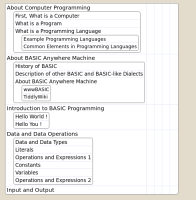
It could be really good at mapping out the structure and components of large programs.

In my screenshot, I'm using it to outline documentation I'd like to create.
   

And a screenshot from the TreeSheets web site:

[Image: screenshot-todo-half.png]

It is really worth trying out once by going through the included tutorial.  Pretty ingenious thing.

Reply
#2
Thanks for this, I'm one who writes a lot on white boards and paper first to try and layout the logical order of things. As my program code gets longer and longer its' very hard to see the whole program, so I do tend to got back to the paper of white board and recreate the whole program logic in pseudocode. This TreeSheets looks like a great companion to the written program code.
Reply
#3
This reminds me of Directory and Sub-directory system or even code blocks like nested loops and if-thens.
  724  855  599  923  575  468  400  206  147  564  878  823  652  556 bxor cross forever
Reply
#4
For the giggles, I decided to do a copy and paste of source code into a new TreeSheets document.

TreeSheets as secondary source code editor?  The as-is result:

   
Reply
#5
Smile That tickles my fancy.
  724  855  599  923  575  468  400  206  147  564  878  823  652  556 bxor cross forever
Reply
#6
(02-23-2023, 08:11 PM)bplus Wrote: Smile That tickles my fancy.

Well, I do fancy a tickle for the giggle.

Now we only need Pete thrown into the mix.
Reply
#7
My favourite thing, I think, is the ability to zoom in/out the content of any cell via the scroll wheel on the mouse.

The screenshot below shows the bird's eye view of the thing, so I can see the whole picture (all of the parts).

To see how much content and how many parts are in there, see https://basicanywheremachine.neocities.o...anning.png

   
Reply
#8
Just another example of using TreeSheets to help analyse a large program.

Code for this example from https://qb64phoenix.com/forum/showthread...2#pid17322.

New treesheet document created, and QB64PE code copied info the one treesheet cell.  (Not shown: I forgot to first wrap the cell in a parent cell.)

Notice that indented source code automagically goes into a "child cell".


Not shown, I then wrapped what I pasted into Treesheets into a parent cell.  That so I can SHIFT-scroll wheel to increase/decrease the size of everything in the parent cell.

Here, I've shrunken everything down (SHIFT and scroll back the mouse wheel on the parent cell) all the way to have a bird's eye view of the code:


After zooming everything in just a little, I found the area of the program I'm interested in, towards the bottom of the program:


Then I zoomed in on the subroutine I was looking for,:


SHIFT and mouse scroll wheel to quickly zoom in and zoom out to any one cell and all child cells.  Very awesome stuff.
Reply


Possibly Related Threads…
Thread Author Replies Views Last Post
  Tool for testing SCREEN viewport (Lububtu's bug) TempodiBasic 8 774 11-27-2025, 12:54 AM
Last Post: TempodiBasic
  Pete's Handy Dandy File Compare Tool Pete 0 526 11-12-2024, 02:39 AM
Last Post: Pete
  Pete's handy dandy compare tool... Pete 0 573 10-25-2024, 01:20 AM
Last Post: Pete
  FeatherWiki, super-light tool that's handy for all sorts of things. CharlieJV 0 480 03-26-2023, 07:19 PM
Last Post: CharlieJV
  Explosions - Handy Drawing Tool bplus 1 660 02-09-2023, 04:30 AM
Last Post: bplus

Forum Jump:


Users browsing this thread: 1 Guest(s)
