

Thread Rating:
  • 0 Vote(s) - 0 Average
  • 1
  • 2
  • 3
  • 4
  • 5
pasting text into the forums editor always pastes as size=1 ?
#1
Does anyone else notice this quirk, where if you paste text into the forums editor, it always shows up size=1 ? 

For example if I copy a single word or phrase "my text" and paste it in here, I get:

Code: (Select All)
[.size=1]my text[./size]
(Note I added a "." so the editor doesn't think they're actual formatting. Even in a code block it seems to interpret those as actual formatting tags.)

It really becomes a problem when pasting in larger text that has formatting. 
For example text copied from here:
   

pasted into the editor looks like this:
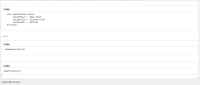
   

and dropping down to code view, we have this mess:
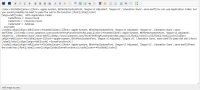
   

which wouldn't be so bad, but why the [.size=1] ? 

Is there any way to stop the editor from doing that? 

Any help appreciated!

Reply
#2
See the ribbon of buttons above your post area?  Click the last button on the right. That's all you usually need to do.

28

You can use Application.Caller, but you would probably be best to pass the cell to the function.

  With Application.Caller
        CallerRows = .Rows.Count
        CallerCols = .Columns.Count
        CallerAddr = .Address
  End With
See: http://www.cpearson.com/excel/WritingFun...InVBA.aspx

To pass the cell:

=SomeFunction(A1)
Where the code has:

SomeFunction(r)
Share
Improve

See how pretty that shows up, if you just click the VIEW SOURCE button (Ctrl-Shift-S) *before* pasting into the forums?
Reply
#3
(02-07-2024, 05:48 PM)SMcNeill Wrote: See the ribbon of buttons above your post area?  Click the last button on the right.  That's all you usually need to do.

...
See how pretty that shows up, if you just click the VIEW SOURCE button (Ctrl-Shift-S) *before* pasting into the forums?

Let me give it a try...

You can use Application.Caller, but you would probably be best to pass the cell to the function.

With Application.Caller
CallerRows = .Rows.Count
CallerCols = .Columns.Count
CallerAddr = .Address
End With
See: http://www.cpearson.com/excel/WritingFun...InVBA.aspx

To pass the cell:

=SomeFunction(A1)
Where the code has:

SomeFunction(r)


Well that was easy... Thank you sir!
Reply
#4
Steve the Amazing(tm) saves the day once again!!  Big Grin
Reply


Possibly Related Threads…
Thread Author Replies Views Last Post
  are the forums having technical issues? madscijr 8 1,291 07-16-2025, 01:40 PM
Last Post: SpriggsySpriggs
  Dark Mode Theme Text Size TerryRitchie 2 1,072 03-01-2024, 05:40 PM
Last Post: TerryRitchie

Forum Jump:


Users browsing this thread: 1 Guest(s)