Posts: 4,702
Threads: 222
Joined: Apr 2022
Reputation:
322
05-09-2023, 02:29 PM
(This post was last modified: 05-09-2023, 03:44 PM by bplus.)
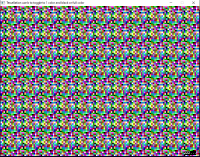
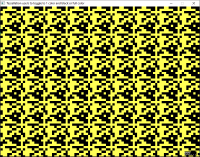
Inspired by Charlie's BAM version I started from scratch for QB64 version with added full colorization mode.
Use b key to toggle color modes or esc to quit, any other key shows another random tile tessellated screen:
Code: (Select All) _Title "Tessellation use b to toggle to 1 color and black or full color"
' b+ 2023-05-09 - Tiling with a pattern
'
' Inspired by Charlie's BAM example:
' https://qb64phoenix.com/forum/showthread.php?tid=1646&pid=15772#pid15772
'
' But I also wanted to try a colorized version.
'
' So use b key to toggle between:
' 1. a mod of Charlies version with different pixel block size with black backgrounds
' 2. the colorized version which reminds me of Magic Eye Art
'
DefLng A-Z
Screen _NewImage(800, 600, 12) ' only 16 colors here
_ScreenMove 250, 50
Dim Shared Pix ' Pix is number of pixels to Tile side
Dim Shared Scale ' Change a pixel to a bigger square block for not so subtle patterns
Dim Shared Tile ' Handle that stores Tile Image in memory to call up with _PutImage
Dim Shared B ' Set color mode from Full 16 colors Rainbow to 1 like for printing a label
Do
If InKey$ = "b" Then B = 1 - B ' toggle coloring mode on a b keypress
MakeTile ' create a new random tiling pattern
Tessellate ' tile the screen with it
_PrintString (740, 580), "ZZZ..." ' Show user we are sleeping awaiting a key press
Sleep
Loop Until _KeyDown(27) ' quit when detect escape key on sleep
Sub MakeTile ' make a random tile to Tesselate according to B Mode coloring
Pix = Int(Rnd * 9) + 4 ' sets tile size: pix X pix or a 4X4 to 12X12 Tile coloring
Scale = Int(Rnd * 6) + 4 ' to change pixels to square blocks
If Tile Then _FreeImage Tile ' throw old image away
Tile = _NewImage(Scale * Pix - 1, Scale * Pix - 1) ' make new one
_Dest Tile ' draw in the memory area Tile not on screen
oneColor = Int(Rnd * 15) + 1 ' one color and black background for B Mode
For y = 0 To Scale * Pix - 1 Step Scale
For x = 0 To Scale * Pix - 1 Step Scale
If B Then
If Rnd < .5 Then c = 0 Else c = oneColor 'one color and black background for B Mode
Else
c = Int(Rnd * 16)
End If
Line (x, y)-Step(Scale, Scale), c, BF ' draw square that is scaled pixel
Next
Next
_Dest 0
End Sub
Sub Tessellate ' just covering the screen with our Tile
For y = 0 To _Height Step Scale * Pix
For x = 0 To _Width Step Scale * Pix
_PutImage (x, y)-Step(Scale * Pix - 1, Scale * Pix - 1), Tile, 0
Next
Next
End Sub
724 855 599 923 575 468 400 206 147 564 878 823 652 556 bxor cross forever
Posts: 688
Threads: 154
Joined: Apr 2022
Reputation:
67
05-09-2023, 07:37 PM
(This post was last modified: 05-09-2023, 10:36 PM by James D Jarvis.)
Tessellation madness, because I couldn't help myself.
"x","X","y","Y",",",".","[","]","-","=" all do something. Maybe this could be made more coherent, but what fun is that?
EDIT: commented out DEflng, shifting X&Y works now.
Code: (Select All) _Title "Tessellation Madness"
'based on progrma by b+ 2023-05-09 - Tiling with a pattern
'
' Inspired by Charlie's BAM example:
' https://qb64phoenix.com/forum/showthread.php?tid=1646&pid=15772#pid15772
'
' But I also wanted to try a colorized version.
'
' So use b key to toggle between:
' 1. a mod of Charlies version with different pixel block size with black backgrounds
' 2. the colorized version which reminds me of Magic Eye Art
'
'DefLng A-Z ' EDITED OUT
Screen _NewImage(800, 600, 256) ' only 16 colors here
_ScreenMove 250, 50
Dim Shared Pix ' Pix is number of pixels to Tile side
Dim Shared Scale ' Change a pixel to a bigger square block for not so subtle patterns
Dim Shared Tile ' Handle that stores Tile Image in memory to call up with _PutImage
Dim Shared B ' Set color mode from Full 16 colors Rainbow to 1 like for printing a label
Dim Shared olap ' tile overlap , probably wrong name
Dim Shared rr 'ramdom offset on or off
Dim Shared xs ' tile x shift
Dim Shared ys 'tile y shift
olap = 0
xs = 1.5
ys = 1.5
Pix = Int(Rnd * 16) + 4 ' sets tile size: pix X pix or a 4X4 to 12X12 Tile coloring
Scale = Int(Rnd * 6) + 4 ' to change pixels to square blocks
Do
kk$ = InKey$
Select Case kk$
Case "b"
B = 1 - B
Case "r"
r = 1 - r
Case ",", "<"
olap = olap - 1
If olap < -3 Then olap = -3
Case "x"
xs = xs - .1
Case "y"
ys = ys - .1
Case "X"
xs = xs + .1
Case "Y"
ys = ys + .1
Case ".", ">"
olap = olap + 1
Case "-"
Pix = Pix - 1
If Pix < 2 Then Pix = 2
Case "="
Pix = Pix + 1
Case "["
Scale = Scale - 1
If Scale < 2 Then Scale = 2
Case "]"
Scale = Scale + 1
End Select
MakeTile ' create a new random tiling pattern
Tessellate ' tile the screen with it
' MakeTile ' create a new random tiling pattern
'Tessellate ' tile the screen with it
_PrintString (740, 580), "ZZZ..." ' Show user we are sleeping awaiting a key press
Sleep
Loop Until _KeyDown(27) ' quit when detect escape key on sleep
Sub MakeTile ' make a random tile to Tesselate according to B Mode coloring
'Pix = Int(Rnd * 16) + 4 ' sets tile size: pix X pix or a 4X4 to 12X12 Tile coloring
' Scale = Int(Rnd * 6) + 4 ' to change pixels to square blocks
If Tile Then _FreeImage Tile ' throw old image away
Tile = _NewImage(Scale * Pix - 1, Scale * Pix - 1) ' make new one
_Dest Tile ' draw in the memory area Tile not on screen
oneColor = Int(Rnd * 255) + 1 ' one color and black background for B Mode
For p = 1 To Pix * Pix
'For y = 0 To Scale * Pix - 1 Step Scale
'' For x = 0 To Scale * Pix - 1 Step Scale
y = Int((Rnd * (Scale * Pix - 1) + Rnd * (Scale * Pix - 1)) / 2)
x = Int((Rnd * (Scale * Pix - 1) + Rnd * (Scale * Pix - 1)) / 2)
If B Then
If Rnd < .5 Then c = 0 Else c = oneColor 'one color and black background for B Mode
Else
c = Int(Rnd * 256)
End If
Line (x, y)-Step(Scale, Scale), c, BF ' draw square that is scaled pixel
' Next
'Next
Next p
_Dest 0
End Sub
Sub Tessellate ' just covering the screen with our Tile
Line (0, 0)-(_Width, _Height), Int(1 + Rnd * 255), BF
tolap = olap
If olap + Pix = 0 Then tolap = -(Pix - 1)
st = (Scale * Pix)
y = -tolap - st
x = -tolap - st
' For y = 0 To _Height Step st
Do
y = y + st + tolap
'For x = 0 To _Width Step st
Do
x = x + st + tolap
_ClearColor 0
xoff = Int(Rnd * 3) - Int(Rnd * 3)
yoff = Int(Rnd * 3) - Int(Rnd * 3)
_PutImage (x + tolap + xoff, y + tolap + yoff)-Step(st - 1, st - 1), Tile, 0
Loop While x <= _Width
If x > _Width Then x = -tolap - st
Loop While y <= _Height
y = -tolap - (st * ys)
x = -tolap - (st * xs)
' For y = 0 To _Height Step st
Do
y = y + st + tolap
'For x = 0 To _Width Step st
Do
x = x + st + tolap
_ClearColor 0
If rr Then
xoff = Int(Rnd * st * .7) - Int(Rnd * st * .7)
yoff = Int(Rnd * st * .7) - Int(Rnd * st * .7)
Else
xoff = 0
yoff = 0
End If
_PutImage (x + tolap + xoff, y + tolap + yoff)-Step(st - 1, st - 1), Tile, 0
Loop While x <= _Width
If x > _Width Then x = -tolap - (st * xs)
Loop While y <= _Height
End Sub
Posts: 1,356
Threads: 58
Joined: Jul 2022
Reputation:
53
LOL this last one listed was funny. I like how it reacts while zooming out, then zooming back in to get the junk of particles again.
Posts: 4,702
Threads: 222
Joined: Apr 2022
Reputation:
322
Nice mod @James D Jarvis
I haven't figured out what x, y do because screens are different every time press spacebar = new pattern but [] is obviously changing the size of "pixel" block.
BTW did you notice the DefLng A-Z so you have to be careful if you want Single Float type calculations ie changing x and y by .1 wont do much until they accumulate an integer amount.
724 855 599 923 575 468 400 206 147 564 878 823 652 556 bxor cross forever
Posts: 1,356
Threads: 58
Joined: Jul 2022
Reputation:
53
I made changes so "xs", "ys" and "scale" and the local "x" and "y" of the subprograms were single-prec. It didn't make a lot of difference in the program output.
Posts: 4,702
Threads: 222
Joined: Apr 2022
Reputation:
322
05-09-2023, 09:11 PM
(This post was last modified: 05-09-2023, 09:30 PM by bplus.)
(05-09-2023, 08:14 PM)mnrvovrfc Wrote: I made changes so "xs", "ys" and "scale" and the local "x" and "y" of the subprograms were single-prec. It didn't make a lot of difference in the program output.
Thankyou, you saved me from that very experiment 
I also tried a pixel off set in my code in attempts to draw patterns on diagonals but something was wrong minded how I did it.
I think setting a background black color 1/3 to 2/3 of time might make colorful tessellations more "meaningful" by looking more like an object with a background instead of a wall texture as James has done tiles of balls.
Update: Yeah with black background more often it looks more "patternly" Limiting colors is maybe a rabbit hole? But here in Tessellations 2 I use 2 pallets for color filled tiles. One pallet is in blues and white then other darker red, green, yellow/brown:
Code: (Select All) _Title "Tessellation 2 use b to toggle to 1 color and black or full color"
' b+ 2023-05-09 - Tiling with a pattern
' Tessellation 2 will try color filled with more background black.
'
' Inspired by Charlie's BAM example:
' https://qb64phoenix.com/forum/showthread.php?tid=1646&pid=15772#pid15772
'
' But I also wanted to try a colorized version.
'
' So use b key to toggle between:
' 1. a mod of Charlies version with different pixel block size with black backgrounds
' 2. the colorized version which reminds me of Magic Eye Art
'
DefLng A-Z
Screen _NewImage(800, 600, 12) ' only 16 colors here
_ScreenMove 250, 50
Dim Shared Pix ' Pix is number of pixels to Tile side
Dim Shared Scale ' Change a pixel to a bigger square block for not so subtle patterns
Dim Shared Tile ' Handle that stores Tile Image in memory to call up with _PutImage
Dim Shared B ' Set color mode from Full 16 colors Rainbow to 1 like for printing a label
Do
If InKey$ = "b" Then B = 1 - B ' toggle coloring mode on a b keypress
MakeTile ' create a new random tiling pattern
Tessellate ' tile the screen with it
_PrintString (740, 580), "ZZZ..." ' Show user we are sleeping awaiting a key press
Sleep
Loop Until _KeyDown(27) ' quit when detect escape key on sleep
Sub MakeTile ' make a random tile to Tesselate according to B Mode coloring
Pix = 8 'Int(Rnd * 9) + 4 ' sets tile size: pix X pix or a 4X4 to 12X12 Tile coloring
Scale = Int(Rnd * 6) + 4 ' to change pixels to square blocks
If Tile Then _FreeImage Tile ' throw old image away
Tile = _NewImage(Scale * Pix - 1, Scale * Pix - 1) ' make new one
_Dest Tile ' draw in the memory area Tile not on screen
oneColor = Int(Rnd * 15) + 1 ' one color and black background for B Mode
pall = Int(Rnd * 2)
For y = 0 To Scale * Pix - 1 Step Scale
For x = 0 To Scale * Pix - 1 Step Scale
If B Then
If Rnd < .5 Then c = 0 Else c = oneColor 'one color and black background for B Mode
Else
If Rnd < .5 Then c = 0 Else c = 2 * Int(Rnd * 8) + 1 + pall
End If
Line (x, y)-Step(Scale, Scale), c, BF ' this should be integer since Tile is
Next
Next
_Dest 0
End Sub
Sub Tessellate ' just covering the screen with our Tile
For y = 0 To _Height Step Scale * Pix
For x = 0 To _Width Step Scale * Pix
_PutImage (x, y)-Step(Scale * Pix - 1, Scale * Pix - 1), Tile, 0
Next
Next
End Sub
Tess 2 pal 1, one of them:

Tess 2 pal 2, the other pal:

724 855 599 923 575 468 400 206 147 564 878 823 652 556 bxor cross forever
Posts: 329
Threads: 22
Joined: Apr 2022
Reputation:
60
Posts: 4,702
Threads: 222
Joined: Apr 2022
Reputation:
322
now there's a comment!
724 855 599 923 575 468 400 206 147 564 878 823 652 556 bxor cross forever
Posts: 688
Threads: 154
Joined: Apr 2022
Reputation:
67
05-09-2023, 10:30 PM
(This post was last modified: 05-09-2023, 10:38 PM by James D Jarvis.)
(05-09-2023, 08:00 PM)bplus Wrote: Nice mod @James D Jarvis
I haven't figured out what x, y do because screens are different every time press spacebar = new pattern but [] is obviously changing the size of "pixel" block.
BTW did you notice the DefLng A-Z so you have to be careful if you want Single Float type calculations ie changing x and y by .1 wont do much until they accumulate an integer amount.
yeah there are a couple problems I likely wouldn't have introduced if I had not been eating lunch at the time.
Just commenting out the deflng seems to work in my crazed hack.
Posts: 4,702
Threads: 222
Joined: Apr 2022
Reputation:
322
05-10-2023, 12:12 AM
(This post was last modified: 05-10-2023, 12:50 AM by bplus.
Edit Reason: Found flaws in code, fixed now plus back to random pix number and scales
)
So Charlie if one symmetry is good, what's 2 way symmetry look like:
Code: (Select All) _Title "Tessellation 3 use b to toggle to 1 color and black or full color"
' b+ 2023-05-09 - Tiling with a pattern
' Tessellation 2 will try color filled with more background black.
' Tessellation 3 Charlie mentions a mirror image for interesting tessellating,
' lets try mirroring both x and y axis.
'
' Inspired by Charlie's BAM example:
' https://qb64phoenix.com/forum/showthread.php?tid=1646&pid=15772#pid15772
'
' But I also wanted to try a colorized version.
'
' So use b key to toggle between:
' 1. a mod of Charlies version with different pixel block size with black backgrounds
' 2. the colorized version which reminds me of Magic Eye Art
'
DefLng A-Z
Screen _NewImage(800, 600, 12) ' only 16 colors here
_ScreenMove 250, 50
Dim Shared Pix ' Pix is number of pixels to Tile side
Dim Shared Scale ' Change a pixel to a bigger square block for not so subtle patterns
Dim Shared Tile ' Handle that stores Tile Image in memory to call up with _PutImage
Dim Shared B ' Set color mode from Full 16 colors Rainbow to 1 like for printing a label
Do
If InKey$ = "b" Then B = 1 - B ' toggle coloring mode on a b keypress
MakeTile ' create a new random tiling pattern
Tessellate ' tile the screen with it
_PrintString (740, 580), "ZZZ..." ' Show user we are sleeping awaiting a key press
Sleep
Loop Until _KeyDown(27) ' quit when detect escape key on sleep
Sub MakeTile ' make a random tile to Tesselate according to B Mode coloring
Pix = Int(Rnd * 9) + 4 ' sets tile size: pix X pix or a 4X4 to 12X12 Tile coloring
Scale = Int(Rnd * 6) + 4 ' to change pixels to square blocks
If Tile Then _FreeImage Tile ' throw old image away
Tile = _NewImage(2 * Scale * Pix - 1, 2 * Scale * Pix - 1) ' make new one
_Dest Tile ' draw in the memory area Tile not on screen
oneColor = Int(Rnd * 15) + 1 ' one color and black background for B Mode
For y = 0 To Scale * Pix Step Scale
For x = 0 To Scale * Pix Step Scale
If B Then
If Rnd < .5 Then c = 0 Else c = oneColor 'one color and black background for B Mode
Else
c = Int(Rnd * 16)
End If
Line (x, y)-Step(Scale, Scale), c, BF ' this should be integer since Tile is
Line (2 * Scale * Pix - x - 1, y)-Step(Scale, Scale), c, BF
Line (x, 2 * Scale * Pix - y - 1)-Step(Scale, Scale), c, BF
Line (2 * Scale * Pix - x - 1, 2 * Scale * Pix - y - 1)-Step(Scale, Scale), c, BF
Next
Next
_Dest 0
End Sub
Sub Tessellate ' just covering the screen with our Tile
For y = 0 To _Height Step 2 * Scale * Pix
For x = 0 To _Width Step 2 * Scale * Pix
_PutImage (x, y)-Step(2 * Scale * Pix, 2 * Scale * Pix), Tile, 0
Next
Next
End Sub
Full color is back with all 16 available for being employed:

Toggle to 1 color and black:

Gotta say, so far I think I am progressing after edit, I see something wrong in symmetry of crosses, dang!
EDIT #2: OK now I think I got perfect symmetry, updated code and snaps.
724 855 599 923 575 468 400 206 147 564 878 823 652 556 bxor cross forever
|