Thread Rating:
  • 0 Vote(s) - 0 Average
  • 1
  • 2
  • 3
  • 4
  • 5
BAM: SCROLL statement "super-test"
#1
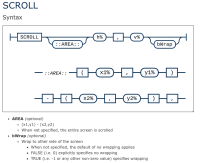
If you feel like beating the thing up: test version of BASIC Anywhere Machine.

The test program:

EDIT:  The program loops through various scrolling scenarios, incrementing the number of pixels scrolled by 1 every iteration of the loop.  Each scroll scenario performs the scroll 20 times.  All in fairly slow speed to give an opportunity to see positions of a pixel before and after a scroll statement.


Reply
#2
Hi Charlie, what you are doing in demo could easily be done by color shifting on a pallet.
The same could be done with text by position shifting start point of display for text.

Here is old demo in QB64:
Code: (Select All)

_Title "Color Cycle AKA Palette Shifting?" 'B+ 2019-04-13 trans from SdlBasic code
'color cycle test.sdlbas {B+=MGA 2016-06-04


Randomize Timer
'option qbasic
Const xmax = 400 '<==== drawing area width
Const ymax = 300 '<==== drawing area height
'setdisplay(xmax, ymax, 32, 1)
'setcaption("Color Cycle test.sdlbas")  '<===================== screen title
'autoback(-2)
Screen _NewImage(xmax, ymax, 32)

'dim common pal(16), cIndex=0
Dim Shared pal(16) As _Unsigned Long
Dim Shared cIndex As Integer

'QB colors approx
pal(0) = &HFF000000
pal(1) = &HFF000077
pal(2) = &HFFFF8866
pal(3) = &HFF008888
pal(4) = &HFF880000
pal(5) = &HFFFF8800
pal(6) = &HFF008800
pal(7) = &HFFBBBBBB
pal(8) = &HFF666666
pal(9) = &HFF0000FF
pal(10) = &HFF00FF00
pal(11) = &HFF00FFFF
pal(12) = &HFFFF0000
pal(13) = &HFFFF00FF
pal(14) = &HFFFFFF00
pal(15) = &HFFFFFFFF


While 1
    Cls
    For i = 0 To 15
        'simulate a Palette Shift by shifting the indexs to Palette calls
        Line (i * 20 + 40, 100)-Step(20, 100), pal((cIndex + i) Mod 16), BF
        cText xmax / 2, 50, 16, pal(15), "Index called:"
        cText i * 20 + 5 + 40, 70, 16, pal(15), Str$(i)
        cText xmax / 2, 220, 16, pal(15), "Shifted Index call:"
        cText i * 20 + 5 + 40, 240, 16, pal(15), Str$((cIndex + i) Mod 16)
    Next
    _Display
    _Limit 1
    'INPUT "Press enter for Palette shifting +1 "; wate$
    cIndex = (cIndex + 1) Mod 16 'color shift
Wend

Function ccycle (cNum)
    ccycle = pal((cIndex + cNum) Mod 16)
End Function

Sub cText (x, y, textHeight, K As _Unsigned Long, txt$)
    fg = _DefaultColor
    'screen snapshot
    cur& = _Dest
    I& = _NewImage(8 * Len(txt$), 16, 32)
    _Dest I&
    Color K, _RGBA32(0, 0, 0, 0)
    _PrintString (1, 1), txt$
    mult = textHeight / 16
    xlen = Len(txt$) * 8 * mult
    _PutImage (x - .5 * xlen + 1, y - .5 * textHeight + 1)-Step(xlen, textHeight), I&, cur&
    Color fg
    _FreeImage I&
End Sub

Of course this can be done without _PutImage by redrawing over same screen area each loop.

Maybe I am missing something?
  724  855  599  923  575  468  400  206  147  564  878  823  652  556 bxor cross forever
Reply
#3
(06-27-2023, 12:49 PM)bplus Wrote: Hi Charlie, what you are doing in demo could easily be done by color shifting on a pallet.
The same could be done with text by position shifting start point of display for text.

Here is old demo in QB64:
Code: (Select All)

_Title "Color Cycle AKA Palette Shifting?" 'B+ 2019-04-13 trans from SdlBasic code
'color cycle test.sdlbas {B+=MGA 2016-06-04


Randomize Timer
'option qbasic
Const xmax = 400 '<==== drawing area width
Const ymax = 300 '<==== drawing area height
'setdisplay(xmax, ymax, 32, 1)
'setcaption("Color Cycle test.sdlbas")  '<===================== screen title
'autoback(-2)
Screen _NewImage(xmax, ymax, 32)

'dim common pal(16), cIndex=0
Dim Shared pal(16) As _Unsigned Long
Dim Shared cIndex As Integer

'QB colors approx
pal(0) = &HFF000000
pal(1) = &HFF000077
pal(2) = &HFFFF8866
pal(3) = &HFF008888
pal(4) = &HFF880000
pal(5) = &HFFFF8800
pal(6) = &HFF008800
pal(7) = &HFFBBBBBB
pal(8) = &HFF666666
pal(9) = &HFF0000FF
pal(10) = &HFF00FF00
pal(11) = &HFF00FFFF
pal(12) = &HFFFF0000
pal(13) = &HFFFF00FF
pal(14) = &HFFFFFF00
pal(15) = &HFFFFFFFF


While 1
    Cls
    For i = 0 To 15
        'simulate a Palette Shift by shifting the indexs to Palette calls
        Line (i * 20 + 40, 100)-Step(20, 100), pal((cIndex + i) Mod 16), BF
        cText xmax / 2, 50, 16, pal(15), "Index called:"
        cText i * 20 + 5 + 40, 70, 16, pal(15), Str$(i)
        cText xmax / 2, 220, 16, pal(15), "Shifted Index call:"
        cText i * 20 + 5 + 40, 240, 16, pal(15), Str$((cIndex + i) Mod 16)
    Next
    _Display
    _Limit 1
    'INPUT "Press enter for Palette shifting +1 "; wate$
    cIndex = (cIndex + 1) Mod 16 'color shift
Wend

Function ccycle (cNum)
    ccycle = pal((cIndex + cNum) Mod 16)
End Function

Sub cText (x, y, textHeight, K As _Unsigned Long, txt$)
    fg = _DefaultColor
    'screen snapshot
    cur& = _Dest
    I& = _NewImage(8 * Len(txt$), 16, 32)
    _Dest I&
    Color K, _RGBA32(0, 0, 0, 0)
    _PrintString (1, 1), txt$
    mult = textHeight / 16
    xlen = Len(txt$) * 8 * mult
    _PutImage (x - .5 * xlen + 1, y - .5 * textHeight + 1)-Step(xlen, textHeight), I&, cur&
    Color fg
    _FreeImage I&
End Sub

Of course this can be done without _PutImage by redrawing over same screen area each loop.

Maybe I am missing something?

That's flying right over my head.  I have no idea where you're going with that.

This is just to test the SCROLL statement to make sure each pixel is scrolling to the correct position, no matter what parameters get thrown at the statement.  Easier to identify the pixels using color.

SCROLL is about scrolling whatever happens to be on the screen.  All text and all graphics.  All pixels.

I think what you are writing about would only ever apply to the specific graphic used in this test case, but would not work with all cases of whatever is on the screen.
Reply
#4
(06-27-2023, 04:46 AM)CharlieJV Wrote: If you feel like beating the thing up: test version of BASIC Anywhere Machine.

The test program:

Updated the test with the text "Hi" in the middle of the screen.


Attached Files Thumbnail(s)
   
Reply
#5
Yeah, sorry, I guess I confused scrolling a screen with scrolling through other linear things like text or pallets.
  724  855  599  923  575  468  400  206  147  564  878  823  652  556 bxor cross forever
Reply
#6
Just another sanity check to make sure scrolling part of the screen works not just for middling portions:

Code: (Select All)
CONST HORIZONTAL = 2, VERTICAL = 1

SCREEN _NEWIMAGE(16,16,7)

FOR x = 0 TO 14 STEP 2
  FOR y = 0 TO 14 STEP 2
    PSET (x,y), CHOOSE( INT(RND*2)+1, 3, 14)
  NEXT y
NEXT x

_DELAY 1

➔again:

  axis = INT(RND*2) + 1
  this_index = INT(RND*4) * 2
  increment = CHOOSE( INT(RND*2)+1, 1, -1)

  FOR l = 1 TO 10
      IF axis = VERTICAL THEN
          SCROLL (this_index,0)-(this_index,15), 0, increment, TRUE
      ELSE
          SCROLL (0,this_index)-(15,this_index), increment, 0, TRUE
      END IF   
      _DELAY 0.25
  NEXT l


GOTO ➔again
Reply


Possibly Related Threads…
Thread Author Replies Views Last Post
  BAM Draw CharlieJV 9 1,975 11-07-2023, 10:27 PM
Last Post: James D Jarvis
  BAM RbgaBox test: RbgaBox Biaxial Mosaic CharlieJV 4 1,026 09-09-2023, 09:05 PM
Last Post: CharlieJV
  BAM: Howdy Doody PCOPY test CharlieJV 1 611 07-09-2023, 03:36 AM
Last Post: CharlieJV
  BAM: New version CharlieJV 0 485 06-29-2023, 02:22 AM
Last Post: CharlieJV
  BAM: Thinking about adding a SCROLL statement CharlieJV 12 2,164 06-26-2023, 02:36 AM
Last Post: CharlieJV

Forum Jump:


Users browsing this thread: 1 Guest(s)